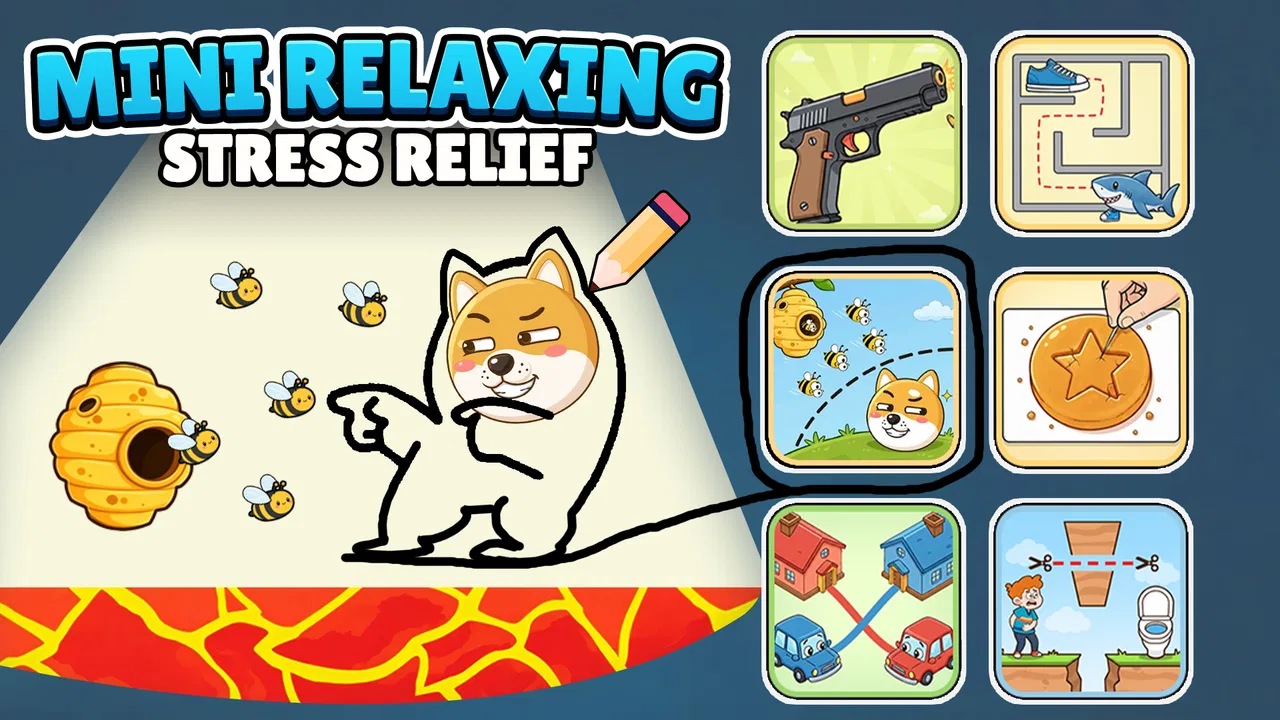
Mini Relaxing – Stress Relief
- 4.5
- Rating
- 5.00M
- Installs
- Free
- Price

 Analysis by App-foxy
I approached Mini Relaxing – Stress Relief as the kind of casual game I could open between two tasks rather than something I would play for a long session. That expectation fits it well. It is a collection of twenty-five small games from QY Studio, designed for brief moments when I want a simple distraction without needing to connect to Wi-Fi. The tone is light, the age rating is Everyone, and the game is free to download.
What makes this collection interesting is not deep progression or a demanding challenge. Its appeal is variety. If one tiny activity does not suit my mood, I can move to another instead of abandoning the whole app. I found that useful during short breaks, especially when I wanted something more interactive than scrolling but less absorbing than a full-sized puzzle or action game.
The game has built a sizeable audience, with an average rating of 4.5 from around 4.6 thousand ratings and more than 5 million installs. Those figures suggest that the simple format is reaching the right people, although popularity does not change the central trade-off: this is a relaxation toy, not a substantial game with a long-term campaign.
You May Also Like

 Google Keep - Notes and lists
Google Keep’s Quiet Growth Shows the Appeal of Simpler Notes
As mobile work gets busier, Google Keep keeps winning a simple contest: capture a thought quickly, find it later, and get on with the day.

 Blood Strike: 2.5 Anniversary
Blood Strike’s Loadouts Turn Every Drop Into a Tactical Gamble
A close look at Blood Strike’s custom loadouts: how fast access to signature weapons reshapes its battle royale rhythm, rewards preparation, and narrows the gap between fights.

 Pandora - Music & Podcasts
Pandora’s Music Is Easy to Start, but Harder to Recover
Pandora’s strength is its low-effort path from a seed to a station. Its weak spot is how much confidence it asks you to place in connection, setup, and quiet recovery.

 8 Ball Pool
 Is Built on Rivalries, Rematches, and Routine
A close look at the rivalries, rematches, shared routines, and unanswered safety questions that turn a quick pool match into a persistent mobile community.

 Samsung Music
’s Quiet Strength Is Playing What You Already Own
Its reach comes less from spectacle than from dependable access to a personal library. That simplicity is both the app’s strongest retention engine and its ceiling.

 AccuWeather: Weather Radar
AccuWeather Review: A Quick, Clear Forecast for Everyday Decisions
For everyday plans, the best forecast is the one you can understand quickly. AccuWeather makes rain timing, radar, and local conditions easy to act on, with a few trade-offs.
More From Our News Desk



Where I got stuck while using the collection
The first point to understand is that the short description, “Mini Relaxing,” sets the right expectation but does not explain how to approach the app. I had to treat each activity as a quick reset rather than search for one perfect game. That small change in attitude matters. Someone expecting a single polished puzzle system may find the collection uneven, while someone looking for variety can appreciate the low commitment.
With twenty-five mini games in one package, the main friction is deciding what to play. A collection can feel convenient, but it can also create choice overload when I only have a minute. My practical solution was to avoid judging the whole app by the first activity I opened. I gave each one a short attempt, then moved on quickly if the controls or rhythm did not feel comfortable.
This is also where the app’s casual identity becomes clear. I would not use it when I wanted a carefully balanced challenge, a story, competitive ranking, or a sense of building toward a major goal. The small activities are better suited to clearing my head than proving skill. That distinction is important for anyone comparing it with a dedicated puzzle game.
Another possible sticking point is the meaning of “stress relief.” I read that as a gentle entertainment goal, not a health treatment. Playing a calm mini game may help me interrupt repetitive thoughts, but it is not a substitute for professional support or a solution to serious stress. I found it most useful when paired with a modest break, not when I expected the app alone to fix my mood.
Why the offline promise changes the way I use it
The ability to play without Wi-Fi is one of the most practical parts of the concept. I could imagine opening it on a commute, in a waiting room, or during a short break where I did not want to spend mobile data. It also makes the app less dependent on a strong connection than many modern casual games.
Still, offline access should not be confused with a guaranteed solution to every loading problem. If the app does not open correctly, I first check whether the installation finished properly and whether the phone has enough free storage for normal operation. I also close other demanding apps before trying again. These are ordinary checks, but they are more useful than repeatedly tapping the same icon.
The game is listed for Android devices running version 7.0 or later. That makes compatibility fairly broad, but an older supported operating system does not guarantee identical performance on every phone. Hardware condition, available memory, and the phone’s own background processes can affect how smoothly any game behaves. I would keep that in mind before blaming the collection for a slowdown that appears elsewhere on the device too.
Setup checks that prevent avoidable frustration
My recommended setup is deliberately simple. I install the game while connected to a stable network, open it once, and let the initial launch settle before testing several activities. Even though the games are intended to work without Wi-Fi, the first installation and any later update still need to complete normally. Starting with a partial or interrupted installation can create confusing behavior later.
I also check the device’s operating system before downloading. The minimum requirement is Android 7.0, so a phone below that level is not a good candidate. On a compatible device, I make sure there is some free space and restart the phone if the installation process appears stuck. A restart is especially sensible when other apps have recently been updating in the background.
After opening the game, I test more than one mini game. This is a useful diagnostic step rather than just a way to browse the collection. If every activity responds slowly, the issue may relate to the device or installation. If only one activity feels awkward while the others respond normally, I treat that as a narrower problem and continue with the parts that work well.
I would also avoid changing several phone settings at once. When troubleshooting, it is better to close background apps, reopen the game, and observe the result before changing other options. That gives me a clearer idea of whether the problem was temporary. The same method helps with touch input: I test the screen in another app so I do not mistake a broader touchscreen issue for a game-specific one.
How I prepare it for a short break
For a practical routine, I place the game where I can reach it without searching through a crowded app drawer. Then I decide what kind of break I need before opening it: a few quiet minutes, a quick change of focus, or a little hand activity while waiting. That prevents me from opening the collection automatically and wandering through every option.
I found it helpful to stop after one or two mini games instead of treating the full collection as a checklist. The point is to return to my task feeling refreshed, not to turn relaxation into another obligation. This is one of the less obvious strengths of the format: the app works best when I use its variety selectively rather than trying to consume all of it.
If a child is using it, the Everyone rating makes the age positioning straightforward, but I would still pay attention to how long the child plays and whether the activities are genuinely calming for them. An age rating does not tell me whether a particular child will enjoy the controls or become frustrated. The adult’s judgment remains more useful than the label alone.
Recovering a disrupted workflow
When the game fails to start, I use a gradual recovery process. First I close it completely and open it again. If that does not help, I restart the phone and confirm that the installation or update has finished. I then try a different mini game after launch. This sequence is basic, but it separates a temporary hiccup from a problem that affects the complete app.
If touch controls seem unresponsive, I check whether the screen works normally in another application. I remove anything that might be interfering with touch input, clean the screen if necessary, and try again without pressing repeatedly. Repeated taps can make a simple delay feel like a control failure, especially in a game built around quick, small interactions.
When performance drops, I close other apps and look at the phone’s available storage. A device that is nearly full or working hard in the background may struggle with many tasks, not just this one. I also avoid testing the game while the phone is unusually hot. Letting the device cool down is a safer and more sensible step than continuing to push it.
If the collection works after a restart but becomes unreliable later, I note what changed. Did I open several demanding apps, switch rapidly between screens, or install an update? That observation can point toward a device-level issue. If the problem remains limited to one mini game, I simply use another activity for the moment rather than allowing one weak experience to define the whole collection.
The current version is 1.29.23, so I check that the installed build is current when an update is available. I do not treat updating as a guaranteed cure, but keeping the app current is a reasonable maintenance step. After updating, I open the game once and test it calmly instead of assuming the problem is solved without checking.
What I do when a session loses its rhythm
Sometimes nothing is technically broken; I am simply not enjoying the activity I chose. In that situation, I do not keep forcing it. I return to the collection and try another mini game, because variety is the main reason to choose this app over a single-purpose casual title. This is a workflow recovery of a different kind: recovering my break from an unhelpful choice.
I also avoid using it as background noise while doing complicated work. Small games still demand attention, and switching between them and a serious task can make the break less restorative. I get more value when I finish a small activity, put the phone down, and return to what I was doing with a clear stopping point.
When the app is not the cause
It is easy to blame a game when a phone feels slow, but the wider context matters. If several apps freeze, the device may need a restart or storage cleanup. If only touch interactions fail across the phone, the problem is unlikely to belong to this collection. If the game opens normally but one action feels difficult, the issue may be the specific activity or simply a mismatch between its control style and my preferences.
The same caution applies to offline play. If I cannot download the game, that is an installation or connection matter rather than an offline gameplay matter. I need the initial download to complete before expecting to use the collection away from Wi-Fi. Once installed, the offline design is useful, but it does not remove the ordinary requirements of downloading and updating an app.
My mood is another factor. A casual collection can be a pleasant interruption when I am mildly bored or mentally tired. It is less suitable when I am deeply upset, unable to concentrate, or looking for structured help with anxiety. In those situations, a conversation, rest, exercise, or professional guidance may be more appropriate than another screen-based distraction.
This is also not the best choice for players who want depth. A dedicated logic game is likely better for someone who enjoys learning a system and improving over time. A story-driven game is better for someone who wants characters and progression. A competitive title is better for someone motivated by opponents or measurable results. Mini Relaxing – Stress Relief wins only when quick variety and low commitment matter more than those features.
How it compares with other casual options
Compared with a single puzzle app, this collection gives me more ways to change pace, but probably less opportunity to master one carefully developed mechanic. Compared with a large online casual game, it is more convenient for disconnected moments and less likely to demand a long session. Compared with simply watching short videos, it gives me active control, although it still keeps me looking at a screen.
That middle position is the app’s clearest identity. It is not trying to replace a full game library, and I would not expect it to. Instead, it fills the gap between having nothing to do and committing to a substantial game. The twenty-five-activity format is especially useful for people who lose interest quickly or want to choose based on their energy level.
The trade-off is consistency. In a collection, not every mini game will match every player’s taste. Some may feel immediately comfortable, while others may seem too simple or less satisfying. I consider that acceptable if I remember that the value comes from the combined selection rather than from demanding excellence from every individual activity.
My practical verdict after using it as a break tool
Mini Relaxing – Stress Relief is strongest as a low-pressure pocket collection. I would recommend it to someone who wants free casual entertainment, prefers short sessions, and likes having several tiny activities available without Wi-Fi. The Everyone rating also makes its intended audience broad, while the Android 7.0 minimum keeps it accessible to many older compatible devices.
QY Studio has chosen a sensible format for quick use. I can open the game, try an activity, switch if it does not suit me, and leave without feeling that I abandoned a complicated campaign. That simple loop is more valuable than it sounds when I am waiting for an appointment or need a short mental reset between chores.
I would skip it if I wanted a deep challenge, a narrative, online competition, or a carefully focused puzzle experience. I would also avoid expecting it to solve serious stress. Its role is smaller and more realistic: a convenient distraction that may help me change mental gears for a few minutes.
Because it is free and has passed the five-million-install mark, it is easy to see why the collection appeals to a wide audience. The average rating of 4.5 is encouraging, but my recommendation still depends on expectations. Download it for variety, offline convenience, and brief casual sessions—not for long-term progression.
In everyday use, I get the best results by installing it on a compatible phone, testing several activities, keeping the device reasonably clear, and choosing one mini game with a definite stopping point. If the app misbehaves, I troubleshoot the phone and installation before assuming the game is at fault. Used that way, this free release from QY Studio is a modest but useful companion for small gaps in the day.
FAQs for Mini Relaxing – Stress Relief
01What is Mini Relaxing – Stress Relief?
Mini Relaxing – Stress Relief is a casual wellness app designed to help users unwind through simple, calming activities. Its experience focuses on short sessions that can be enjoyed whenever you need a mental break, whether after work, before sleeping, or during a stressful moment. The app is easy to approach and does not require previous experience with meditation or relaxation techniques.
02How does Mini Relaxing – Stress Relief help reduce stress?
The app encourages relaxation by giving you brief, distraction-free activities that require gentle attention and repetitive interaction. These mini exercises can help shift your focus away from everyday worries and create a calmer routine. It should not be considered a medical treatment for anxiety or other health conditions, but it can be a useful companion for occasional stress relief and mindful breaks.
03Is Mini Relaxing – Stress Relief suitable for beginners?
Yes. Mini Relaxing – Stress Relief is aimed at a broad audience, including people who have never used a wellness or mindfulness app before. The activities are presented in a straightforward way, so you can start without studying complicated instructions. Its short format is especially convenient for beginners who may find longer meditation sessions difficult to maintain or fit into a busy schedule.
04Can I use Mini Relaxing – Stress Relief offline?
Offline availability may depend on the version of the app and the specific content included on your device. Basic features that have already been downloaded may continue to work without an internet connection, but updates, additional content, advertisements, or certain online services could require access. It is best to check the app-store description and test the features you need before relying on it while traveling.
05Is Mini Relaxing – Stress Relief free to download and use?
Mini Relaxing – Stress Relief may be available as a free download, although the exact experience can vary depending on the platform and version. Some editions of relaxation apps include advertisements, optional purchases, or premium features. Before installing, review the current Google Play or App Store listing for pricing, in-app purchases, subscriptions, and privacy details so there are no surprises.
Pros
- Simple breathing and relaxation exercises for quick stress relief.
- Calming visuals and sounds create a peaceful atmosphere.
- Short sessions fit easily into busy daily routines.
- Beginner-friendly design requires no prior meditation experience.
- Useful for winding down before sleep or during work breaks.
Cons
- Limited variety may make the exercises feel repetitive over time.
- Some relaxing content may require an internet connection.
- Not a substitute for professional help with serious anxiety or stress.
- Minimal progress tracking may not suit users seeking detailed insights.
- Ads or optional purchases could interrupt an otherwise calming experience.

Mini Relaxing – Stress Relief
Gallery